
Yes. Foreign tourists can use eligible NAVER Booking services without a Korean phone number through NAVER’s passport-based verification route. NAVER introduced Passport Verification on June 4, 2026, allowing foreign users to complete supported identity checks with a passport on a smartphone instead of Korean mobile phone verification. You can read the official NAVER announcement about Passport Verification.
Not every place on NAVER Map can be booked this way. The business must use NAVER Booking, have suitable availability, and allow foreign-tourist bookings in its settings.
There is also an important account distinction. Passport Verification is not the same as converting your NAVER ID into a Korean real-name-verified account. NAVER’s guidance for non-resident foreign tourists directs them to use the foreign-tourist booking flow without completing Korean real-name verification.
Prepare the following before you start:
- A NAVER ID suitable for the non-resident foreign-tourist booking flow
- A smartphone with a working camera
- Your original valid passport if Passport Verification is requested
- An internet connection through Wi-Fi, roaming, SIM, or eSIM
- An overseas-issued payment card if your booking requires supported advance payment
Check your NAVER account information before starting verification. NAVER states that the name and date of birth submitted for the account must match the information on your passport.
If you are still deciding which Korean map app to use, the Naver Map vs KakaoMap guide for Korea travelers compares place search, routes, addresses, and other features useful during a trip.
Foreign-tourist booking itself predates Passport Verification. NAVER’s business guidance says participating businesses could begin accepting bookings and orders from non-resident foreign tourists in June 2025. Passport Verification was added on June 4, 2026 to make supported identity verification possible without a Korean mobile phone number.
NAVER says Passport Verification can be used by foreign users for supported travel-related services including NAVER Booking, NAVER Order, and payments through NAVER Map.
An eligible passport must have been issued by a country other than South Korea, must still be valid, and must not already have been used to verify another NAVER ID. The passport name and date of birth must also match the information submitted for your NAVER account.
Verification is completed on a smartphone. NAVER requires you to photograph the original passport directly with your device camera. After the passport is photographed, facial verification compares your face with the passport photograph.
Place the passport on a flat surface, avoid reflections, use good lighting, and make sure camera permission is enabled. NAVER lists the current requirements on its Foreign Passport Verification help page.
Do not confuse Passport Verification with Korean real-name verification. NAVER’s foreign-tourist guidance treats these as different account situations, and its non-resident foreign-tourist booking flow is intended for accounts that have not completed Korean real-name verification.
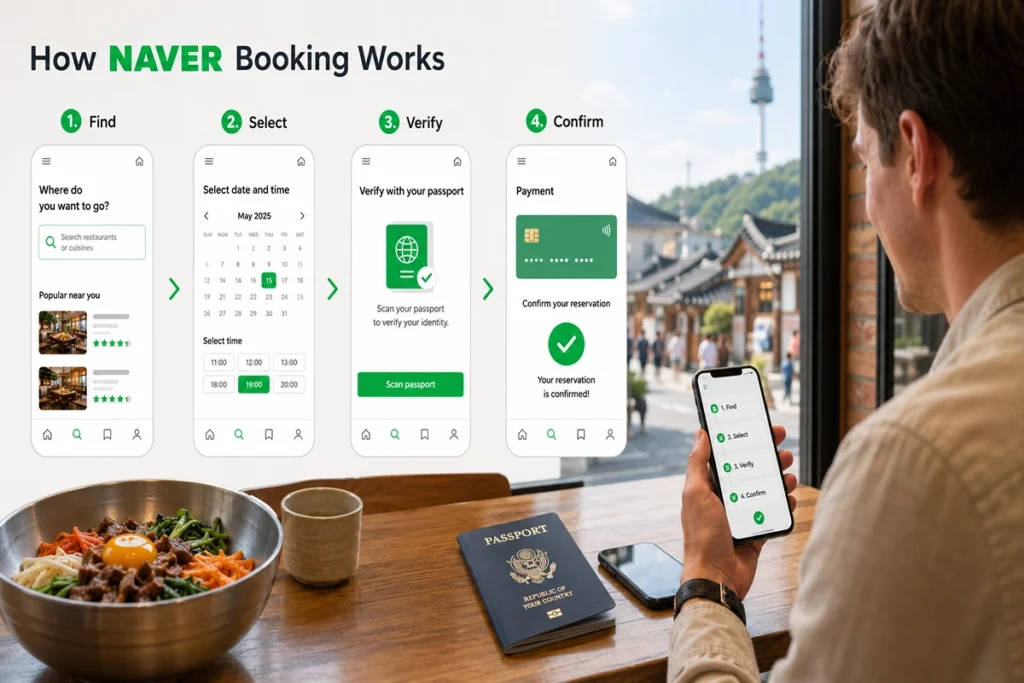
- Sign in to NAVER. Open NAVER Map or NAVER and log in with your NAVER ID.
- Find the exact business. Search for the restaurant, salon, attraction, activity, or other place you want to visit. Confirm the branch name and address before continuing.
- Look for a booking option. Check the listing for a Reserve, Book, or Booking option. If you only see an Order button, confirm whether it is for ordering rather than reserving a time slot.
- Choose the reservation details. Select the service or product, date, time, party size, and any other options requested by the business.
- Complete Passport Verification if requested. If the booking flow requires identity verification and offers the foreign-passport route, follow the camera and facial-verification instructions.
- Review the booking details. Check the reserver information, date, time, branch, party size, and any conditions set by the business.
- Pay if required. Some bookings require advance payment, while others do not require prepayment.
- Check the final booking status. A submitted booking request is not always a confirmed reservation. Wait until NAVER shows that the booking has been confirmed before relying on it.
NAVER’s official booking guide explains that a booking button or booking link is displayed only when the business supports NAVER Booking. It also states that unavailable services, times, or quantities cannot be booked.
Can You Pay With a Foreign Card?
Yes, overseas-issued card payment is supported in eligible foreign-tourist bookings. NAVER’s business guidance states that when a business accepts foreign-tourist bookings and advance payment is required, overseas-card payment is supported for those foreign bookings.
You can review the current conditions in NAVER’s official foreign-tourist booking guidance for businesses.
This does not mean every foreign card will be approved for every transaction. Payment can still depend on the individual booking and approval by your card issuer, so having another suitable card available can be useful for an important reservation.
Some bookings do not require advance payment. Always follow the payment instructions shown for the specific business and reservation rather than assuming every NAVER Booking uses the same payment process.
A missing or unusable booking option does not automatically mean that something is wrong with your foreign account. Several other conditions can prevent a reservation.
- The business does not use NAVER Booking. Not every NAVER Map listing accepts reservations through NAVER.
- The business does not accept the foreign-tourist booking flow. NAVER allows participating businesses to enable or disable bookings from foreign tourists.
- Your preferred slot is unavailable. The selected date, time, party size, service, or quantity may already be full.
- The booking page has been closed. A business can close its booking page, and NAVER may also show an inactive page when reservations are sold out.
- The service requires additional verification. NAVER notes that services requiring adult verification can remain unavailable to foreign-tourist users.
If NAVER shows that your booking request is still being checked, do not treat it as confirmed. NAVER specifically distinguishes a booking request from a confirmed booking.
What to Do If Passport Verification Fails
Start by checking NAVER’s stated eligibility requirements rather than immediately creating another account.
- Make sure the passport has not expired.
- Check whether the passport has already been used to verify another NAVER ID.
- Confirm that your NAVER account name matches the passport.
- Confirm that your date of birth also matches.
- Use the original physical passport during the camera process.
- Place the passport on a flat surface and remove glare or reflections.
- Use enough light for the passport image to be captured clearly.
- Make sure your entire face is visible during facial verification.
- Check that the app or browser has camera permission.
NAVER states that an eligible passport cannot already have been used to verify another NAVER ID, so creating additional accounts is not a good first troubleshooting step.
If you meet the requirements and verification still fails, use the Customer Center link provided on NAVER’s official Passport Verification help page.
No Korean SIM or Korean mobile phone number is required simply to use NAVER’s passport-based verification route. You still need an internet connection, which can come from Wi-Fi, roaming, a data SIM, or an eSIM.
A Korean phone number may still be useful for other parts of a trip, but buying one solely to bypass NAVER identity verification is not necessary for the current passport-based route.
If you are comparing connectivity options, the eSIM vs physical SIM vs roaming guide for Korea explains the main differences for short-term travelers.
NAVER is not the only restaurant reservation route in Korea. A restaurant may use another booking platform, accept direct reservations, operate a waitlist, or simply have no online inventory for your selected date.
For restaurants, check whether the exact branch is available through CATCHTABLE Global. The CATCHTABLE Global restaurant reservation guide explains account setup, reservations, deposits, waitlists, and cancellation considerations for international visitors.
Do not assume a restaurant is closed simply because NAVER does not show a usable reservation. Confirm the Korean business name and exact branch, then check the restaurant’s current official booking method.
Before You Go: Confirm the Reservation
NAVER has made bookings significantly more accessible to non-resident foreign visitors, but it does not mean every foreign tourist can book every place. Business settings, availability, payment requirements, verification rules, and service restrictions can all affect the result.
The safest routine is simple: use the correct foreign-tourist account flow, keep your original passport available when verification is requested, confirm the exact branch and booking conditions, and make sure the reservation shows as confirmed before you travel to the venue.