

Last checked: August 2, 2026. Card acceptance, transportation payment systems and issuer security settings can change, so check the linked official guidance and your card issuer’s current settings before relying on a single payment method for your trip.
If your credit card is not working in Korea, do not assume immediately that the card has been blocked. A failure can be limited to one merchant, one terminal, contactless payment, an online checkout flow or an issuer security setting.
The practical approach is to change one thing at a time. Try the physical chip, use a second card or another payment method, and check your issuer if the same card keeps failing at unrelated businesses.
Quick answer: Try inserting the physical card instead of tapping, use a second card, choose Korean won when Dynamic Currency Conversion is offered, keep a separate transportation payment method, move to a staffed counter when a kiosk fails, check your issuer’s app, and keep a modest cash backup. One failed payment does not mean that foreign cards do not work in Korea.
1. Try One Clear Alternative at the Counter
Credit cards are widely used in Korea. VISITKOREA states that major hotels, department stores and general shops commonly accept credit cards, while also noting that service availability can vary by business.
You can review the current overview on the official VISITKOREA currency and credit-card page.
If one payment attempt fails, avoid repeating exactly the same action several times. Cancel the failed transaction and change one factor.
- Contactless tap failed: insert the physical chip if the terminal supports it.
- Physical card failed: try a second card.
- Mobile wallet failed: use the physical version of the card or another accepted method.
- One terminal failed: ask whether another terminal or staffed checkout is available.
- You need to finish the purchase quickly: use another accepted card or cash if the merchant accepts it.
A backup card from another issuer or payment network can be more useful than two cards that rely on the same account and the same issuer security controls.
If the problem is specifically a phone payment, our guide to Apple Pay in Korea explains contactless compatibility, physical-card backups and the difference between retail payments and transportation payments.
2. Work Out Whether the Problem Is Local or Issuer-Side
One failed payment does not tell you whether the problem is the merchant, terminal, transaction type or your card issuer. Look for a pattern before deciding what to do next.
| What Happened | Possible Explanation | Best Next Move |
|---|---|---|
| The card failed once but worked earlier | The problem may be limited to that terminal or transaction type. | Try the chip, another card or a staffed counter. |
| The same card fails at several unrelated businesses | The issuer may have restricted or blocked the transactions. | Check the issuer’s app and contact the issuer. |
| The card works in person but not online | The website may use a different verification or payment flow. | Check for an official global checkout and review issuer authentication. |
| The card fails only at an unmanned machine | That machine may not support the card or payment route you are trying to use. | Look for international-card markings or move to a staffed counter. |
| An ATM rejects the card | The ATM network, overseas-withdrawal setting, limit, PIN or issuer rule may be involved. | Check the machine’s foreign-card support and your issuer before repeated attempts. |
If the card works normally elsewhere, do not assume that one failed merchant has revealed a countrywide restriction. If it fails repeatedly at unrelated businesses, issuer-side settings become more important to investigate.
3. Choose Korean Won When DCC Is Offered

A Korean payment terminal or ATM may ask whether you want the transaction processed in Korean won or converted into your home currency. The home-currency option is called Dynamic Currency Conversion, or DCC.
Visa explains that DCC can show the converted amount immediately but may include an exchange rate and additional fees or markup set by the conversion provider. The screen should show the relevant currencies, exchange rate and additional charges so you can make the choice yourself.
You can review the details in Visa’s official Dynamic Currency Conversion guide.
For travelers comparing DCC with their own issuer’s normal conversion, choosing KRW means declining the merchant or ATM provider’s home-currency conversion. Review your own card’s foreign-transaction fees before deciding.
Choosing KRW does not fix a declined card. Visa states that accepting or declining DCC should not affect your ability to make an international purchase or withdrawal.
If a Korean terminal asks about installments rather than currency, the question is different. Our guide to what 일시불 means on a Korean card terminal explains the one-time-payment option commonly relevant to short-term visitors.
4. Use a Separate Transportation Payment Method
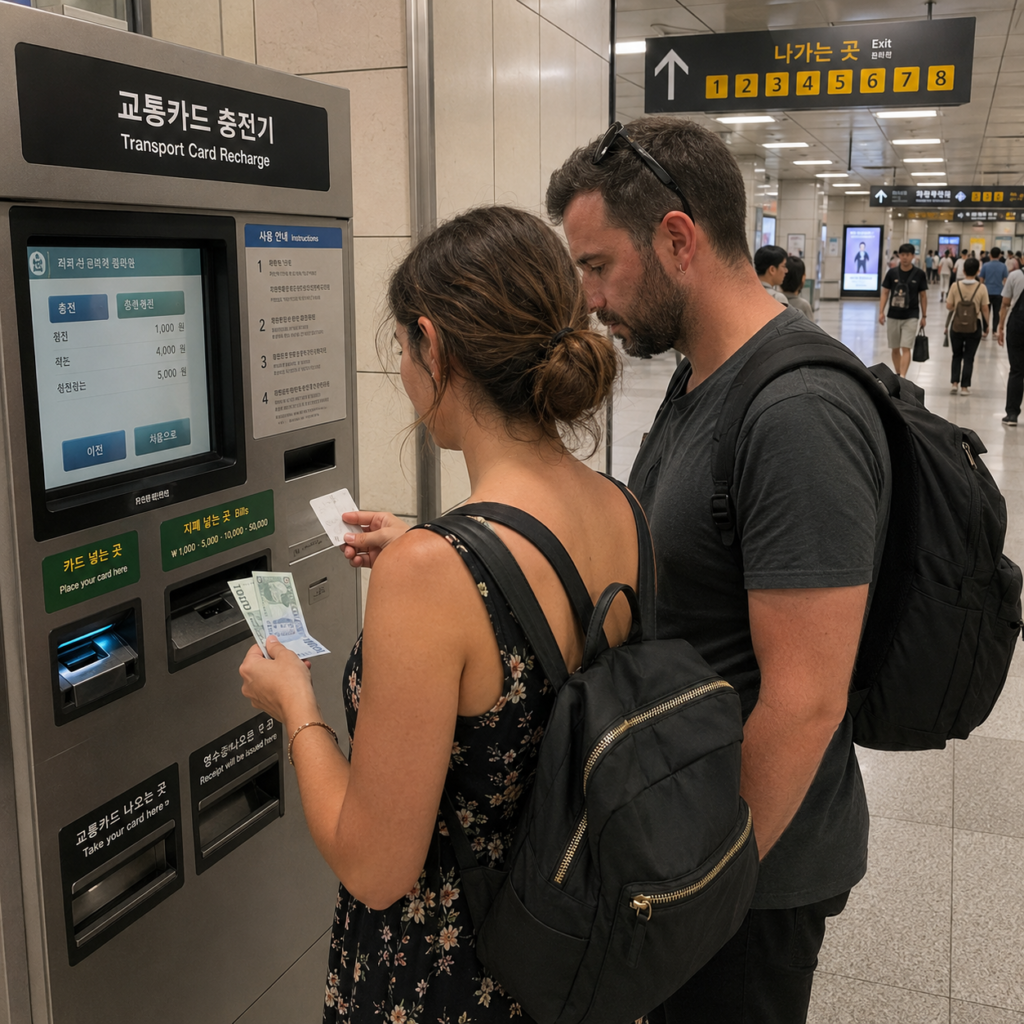
Do not assume that an ordinary foreign bank card can be tapped directly at every Korean subway gate or bus reader. Retail card payments, ticket-machine payments and direct transit-gate payments are different functions.
VISITKOREA currently lists Tmoney, EZL, WOWPASS and the Climate Card among transportation-card options for travelers. Their coverage, purchase methods and other payment features differ.
You can compare the current products on the official VISITKOREA transportation-card guide.
Some Seoul Subway Machines Now Accept International Cards
There is an important 2026 exception. Starting March 17, Seoul expanded international-card payment at 440 new transportation-card vending machines in 273 stations on Lines 1–8.
At those supported machines, internationally issued credit or debit cards can be used for specific products including single-journey tickets and Climate Card short-term passes. Seoul Metropolitan Government explains the current system in its international-card ticket-machine announcement.
This does not mean that the same foreign card can simply be tapped at every subway gate or bus reader, and it does not create universal foreign-card support for every Tmoney purchase or top-up function.
For normal subway and bus use with a physical transportation card, our T-money guide for Seoul explains purchases, loading, gates, buses, transfers and refunds.
5. Move from an Unmanned Machine to a Staffed Counter
A foreign card can work at a hotel or staffed store and still fail at a particular restaurant kiosk, ticket machine, locker or other unmanned terminal. That does not prove that all Korean kiosks reject overseas cards.
If a machine rejects your card:
- Cancel the transaction completely. Do not leave the payment session open.
- Read the available payment methods. Look for international-card or card-network markings.
- Try the chip only when the machine provides that option.
- Move to another machine or staffed counter when available.
- Use another method that the machine or merchant actually accepts.
What If the Problem Is a Korean Website?
Online payment is a different problem from an in-person terminal decline. Korean domestic booking pages may use local phone, identity or payment verification, while an official global or English page may provide a payment flow designed for overseas customers.
Before paying again, check whether a reservation or order was already created. A card notification or pending authorization does not by itself prove that the booking succeeded.
If your problem involves event tickets, read our guide to a foreign credit card payment failing on a Korean ticketing site. It covers global sales pages, issuer authentication, booking status and payment windows in more detail.
6. Check Your Banking App and Contact the Card Issuer
If the same card fails at several unrelated merchants, stop testing it randomly and check the official app or website of the card issuer.
- Fraud or suspicious-transaction alerts
- A temporary card lock
- International in-person payment settings
- International online payment settings
- Daily or per-transaction spending limits
- Available credit or account balance
- Requests to confirm a recent transaction
- A travel-notice feature, if the issuer still uses one
Available controls vary by bank and card. The issuer is the party that can confirm whether an issuer-side decline occurred and whether a restriction can be removed.
Use contact information from the official banking app, official website, statement or the card itself. Do not call a number supplied through an unexpected text message, advertisement or pop-up.
If a failed payment leaves two transaction entries in your banking app, check whether they are pending or posted before trying again. Our guide to what to do if your foreign credit card is charged twice in Korea explains how to identify a temporary authorization, request a duplicate payment cancellation, and dispute an incorrect charge.
7. Keep Cash, ATM and Taxi Backups
You do not need to carry a large amount of Korean won simply because one card might fail. A modest reserve can cover a small purchase, a transportation-card need or an unexpected payment problem.
If you plan to obtain more cash from an ATM, do not assume that every Korean ATM handles overseas cards in the same way. Look for a Global ATM, Foreign Card or International Card option and a network logo matching your card.
If an ATM rejects the card, our guide to what to do when a Korean ATM rejects your foreign card explains network support, PINs, withdrawal settings, transaction limits and cash-advance issues.
Korean taxis generally allow payment by cash, credit card or transportation card according to VISITKOREA. A specific terminal or app transaction can still fail, so keep another payment method available when returning to your accommodation late at night.
You can check the current payment overview on the official VISITKOREA taxi guide.
If the difficulty is communication rather than the card itself, the 1330 Korea Travel Helpline can provide tourism information and interpretation support. It cannot approve a transaction or remove a bank-side card block.
What to Prepare Before Traveling to Korea
- Bring at least two usable payment methods.
- If possible, use cards from different issuers or networks for a more independent backup.
- Confirm overseas in-person and online payment settings before departure.
- Install and test each issuer’s official app.
- Make sure you can receive or complete issuer authentication while abroad.
- Save official support information separately from the physical card.
- Check foreign-transaction and ATM fees.
- Carry a modest amount of Korean won.
- Prepare a transportation-card plan before your first subway or bus ride.
The goal is not to prevent every possible card decline. It is to make sure that one failed payment cannot stop your transportation, meal, accommodation or return trip.
Frequently Asked Questions
Are Visa and Mastercard accepted in Korea?
They are widely accepted at many hotels, department stores, restaurants and general shops, but a card logo does not guarantee approval of every foreign-issued card at every merchant or terminal. Merchant acceptance and issuer authorization are separate issues.
Why does my card work in one Korean shop but fail in another?
The businesses may use different terminals, acquiring arrangements or transaction types. Try another supported payment route before assuming that your issuer has blocked the card.
Should I choose Korean won or my home currency?
If DCC is offered and you choose Korean won, you decline the currency conversion offered by the merchant or ATM provider. Compare your own issuer’s exchange and foreign-transaction terms, and remember that the currency choice itself does not normally fix a declined card.
Can I use a foreign credit card at a Seoul subway ticket machine?
Some newer machines can. Since March 17, 2026, supported vending machines on Seoul Metro Lines 1–8 accept eligible internationally issued cards for products including single-journey tickets and Climate Card short-term passes. This is different from tapping a normal foreign bank card directly at every subway gate.
What should I do if my card fails everywhere?
Stop repeated attempts and check the issuer’s official app for a lock, fraud alert, overseas-payment restriction, spending limit or verification request. Contact the issuer through an official support channel if the problem continues.
Can 1330 fix a declined credit card?
No. 1330 can help with tourism information and interpretation, but your card issuer must handle an issuer-side authorization problem or block.
Final Takeaway
If your credit card does not work in Korea, change one factor at a time rather than repeatedly submitting the same transaction. Try the physical chip, a second card, another supported payment route or a staffed counter.
Choose KRW when you want to decline a DCC conversion, but do not treat currency choice as a solution to a card decline. For transportation, separate direct gate payment from ticket-machine payment and prepare a Korean transportation card when appropriate.
If the same card continues to fail at unrelated businesses, check your issuer. Keep a second card, a modest amount of Korean won and a workable transportation payment method so that one payment problem remains a minor inconvenience rather than a disruption to your trip.